Learning notes from a beginner who tried to understand vectors, embeddings, and how machines “read” text.
When I started working in SEO two years ago, I thought I understood the basics of relevance. If a page had the right keywords, covered the right subtopics, and matched the general theme of a query, then the job was more or less done. But the more I worked, the more I realized that search intent is rarely this clean. Content can appear relevant on the surface yet fail to answer what the user truly wants. As search engines incorporate more semantic and embedding-based systems, this problem becomes even more obvious. It is no longer enough for content to share topical overlap with a query; it must satisfy the underlying meaning.
This gap is what pushed me (very slowly and very messily) toward building a tool that could help me understand semantic alignment the way modern retrieval systems do. I had no background in embeddings. I had no technical roadmap. I used ChatGPT to write ninety percent of the code and then spent days resolving errors I barely understood. But eventually I built something meaningful: a Streamlit-based semantic similarity analyzer powered by Google’s EmbeddingGemma model, with automatic calibration and both section-level and whole-article relevance scoring.
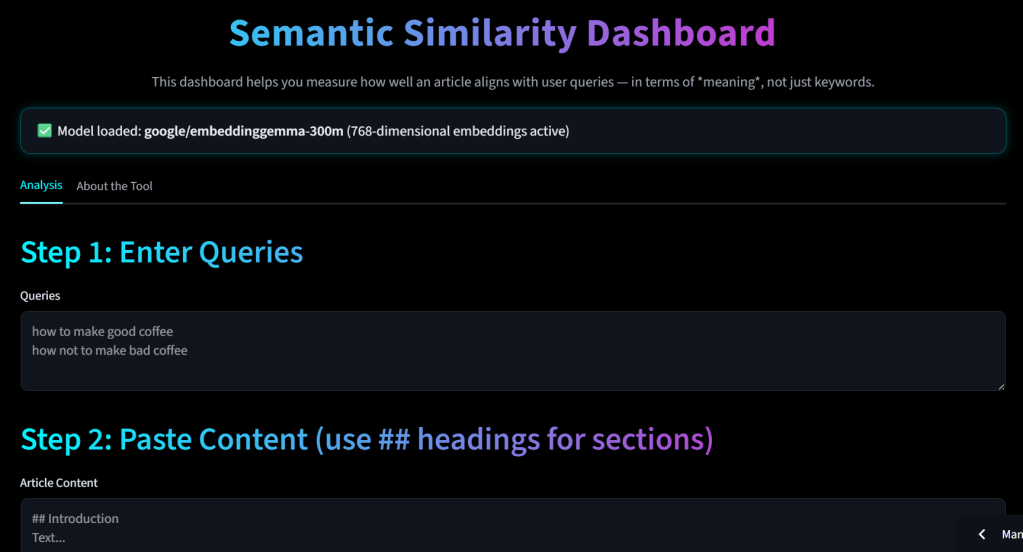
This article is a long explanation of what the tool does, why I built it, how it works under the hood, and the challenges I faced along the way. It is written for SEOs who, like me, are trying to understand the world of vectors and embeddings without pretending to be machine learning engineers.
Why I Wanted a Tool Like This
The starting problem
My initial question was simple:
“How do I know if my content actually answers the query as well as I think it does?”
Traditional SEO checklists—keywords, headings, topical coverage—did not fully answer this. Two pieces of content can share the same keywords yet differ drastically in semantic relevance. Even a human sometimes struggles to judge whether an article actually addresses the intent of a query or only appears to.
The inspiration
I spend a lot of time lurking on X, Bluesky, LinkedIn, Slack groups, and anywhere good SEO conversations happen. One person I always pay attention to is Dejan (Dan Petrovic). He often explores retrieval, embeddings, and the deeper layers of search. When he posted something about EmbeddingGemma and how it could be used for semantic scoring, it nudged me to try building something on my own.
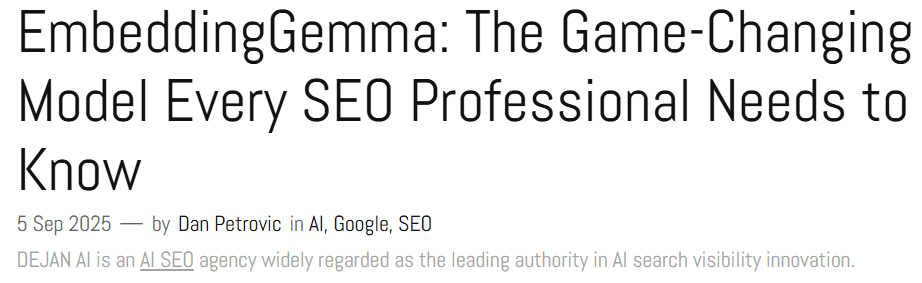
To be clear: I am not claiming any deep technical insight here. I simply read what I could find, tried to follow along, and learned slowly through mistakes. But seeing others openly experiment with embeddings gave me the confidence to attempt my own.
What I Wanted the Tool to Do
My requirements were straightforward:
- Allow me to paste an article (any long-form content).
- Automatically split it into sections based on H2 headings.
- Generate embeddings for each section and for the entire article.
- Generate embeddings for one or more queries (entered by the user).
- Measure similarity between each query and each section.
- Measure whole-article similarity in a way that respects the meaning of the query, not just the general topic of the article.
- Surface patterns, such as:
- “One section matches extremely well but the rest drags the article down.”
- “The article is broadly relevant but fails to give a clear answer anywhere.”
- Automatically calibrate thresholds so I could interpret what a “good” score means.
- Display results clearly in one dashboard.
I wanted a tool that SEOs could use to explore whether their content truly satisfies a user’s need, not just whether it contains similar words.
How the Tool Works (Conceptually)
At a high level, the tool does something very straightforward: it tries to measure how close the meaning of your content is to the meaning of a query. This sounds almost too simple, but when you zoom into every step, there’s an entire process happening in the background. Modern embedding models don’t understand text the way we do; they represent meaning mathematically. They take a sentence, paragraph, or section, and convert it into a long list of numbers — hundreds of values — that encode some kind of “semantic fingerprint.” That fingerprint lives in a huge mathematical space. If two pieces of text mean roughly the same thing, their fingerprints end up pointing in similar directions.
That was the first big mental shift for me: the model isn’t comparing words. It’s comparing directions in a space we can’t see. And that space is built from patterns the model discovered during training. That means when we later measure “similarity” between texts, we’re really measuring how aligned those directions are. It’s a bit like asking: “Are these two ideas pointing toward the same concept?”
So with that in mind, here’s what the tool actually does.
1. It breaks down your article into sections that stand on their own
I used to think of content as one continuous thing. But embedding models don’t see it that way. They treat each chunk of text as its own meaning package. If you embed your whole article at once, you blur everything together. A section that answers the query perfectly gets mixed with parts that are just fluff or tangents.
To avoid this, the tool splits your article wherever it finds an H2 heading (##). Each of those sections becomes a separate “semantic object” — its own mini-document. Conceptually, it’s like slicing the article into paragraphs of meaning instead of paragraphs of formatting. This matters because a query usually relates to only one or two parts of an article, not to the entire article equally.
2. It converts each section and each query into embeddings
This is the most magical part, and also the easiest one to get wrong if you don’t know what’s happening.
When the tool sends text to EmbeddingGemma, the model transforms the text into a vector — a long numeric representation. It doesn’t store grammar, or sentence structure, or keyword density. What it stores is the “essence” of the meaning as best as the model can extract it. For example, “make coffee” and “brew coffee” will end up in a similar region.
Now something subtle happens here. Embedding models often generate better representations when they’re told what kind of text they’re embedding. That’s why I added prefixes like:
document: title: ... | text: ...for contenttask: query: ...for queries
These prefixes give the model light contextual cues, almost like saying, “Hey, this is a query,” or “This is a passage from a document.” They don’t force any changes, but they nudge the model to cluster queries and documents more reliably.
3. It measures how close each section is to the query — mathematically
Once all sections and queries are embedded, the tool computes what’s called cosine similarity. If you haven’t seen cosine similarity before, imagine measuring the angle between two arrows. If the arrows point in almost the same direction, the value is close to 1. If they point in different or opposite directions, the value is lower.
This value becomes your “section relevance score.”
A section scoring 0.85 isn’t just “strong.” It means the model thinks the meaning of that section is extremely close to the meaning of the query. A score of 0.40 means the connection is much weaker. And because it’s built on direction, not magnitude, it doesn’t matter how long the section is — only what direction its meaning points toward.
4. It computes a whole-article score — but not by embedding the whole article at once
At first, I tried embedding the full article in one go. This seemed logical at the time. But the results were extremely inconsistent. Articles with a single excellent section surrounded by irrelevant material scored very low. And sometimes articles that were loosely related to a query but didn’t answer it directly scored oddly high.
Eventually, I learned that embedding the entire article at once creates what I think of as a “semantic blur.” Everything gets averaged together — relevant parts, irrelevant parts, brand mentions, disclaimers, legal notes, footers — all of it. The final fingerprint becomes less about the specific answer and more about the general theme of the article.
That’s why the tool now uses a query-weighted whole article score. Instead of embedding everything as one big block, the tool:
- Computes similarity for every section.
- Takes the top few sections (I chose 5 based on testing).
- Computes a weighted average of those scores.
This way, the whole-article score reflects the best and most meaningful parts of the content, instead of being dragged down by unrelated text. It’s a more faithful representation of how real intent fulfillment works: if your article contains what the user needs (even if it appears in only one part), then the article can satisfy the query.
6. It studies the overall pattern — not just the numbers
This was something I added later, once I started seeing different patterns across articles. Sometimes the top section score was high, but the whole-article score was low. Sometimes it was the opposite. The tool now tries to detect these patterns and give a small warning.
For example:
- If the best section is very strong but the whole article is weak, the tool flags that your relevance is “buried” inside content noise.
- If the whole article seems generally aligned but no section gives a focused answer, it suggests intent is touched but not clearly addressed.
- If everything is low, it suggests a weak match overall.
These are not machine judgments — just practical heuristics based on experience.
7. It generates a recommended threshold so scores make sense
One of the first issues I ran into was:
“Is 0.65 good or bad?”
It turns out the answer depends on the content, the query, and how much noise is in the article. To help with this, the tool collects the top scoring and lowest scoring sections across all queries and calculates:
- a mean score for the “likely relevant” cluster
- a mean score for the “likely irrelevant” cluster
- a midpoint threshold
This threshold gives you a rough idea of how to interpret the numbers. It’s not scientific, but it helps you avoid treating raw similarity scores like absolute truth.
The Technical Challenges I Ran Into
Learning a new idea is one thing; making it work in the real world is another. The first time I ran the code and watched it fail, the error messages felt like a foreign language and the debugging felt brutal. Those early errors taught me more than any tutorial ever could, because each mistake forced me to translate abstract ideas into concrete engineering constraints. Below I walk through the issues that actually slowed me down and why they mattered for the tool’s reliability and trustworthiness.
Token limits and the illusion of completeness
The sharpest, earliest lesson was that embedding models are not magical windows into full documents — they have limits. In practice, transformer-based embeddings have a context window: the model can only process so many tokens at once. If you hand the model a 2,500-word article when the model’s practical context is around 2,000 tokens, the tail of your article will be silently truncated. That explains the bizarre cases where a page that obviously contains the answer still returned a poor similarity score: the model never saw the relevant text.
Choosing chunk boundaries (H2s are pragmatic but imperfect)
Splitting on H2s solved the truncation problem but introduced a new question: what is the “right” way to chunk an article? I chose H2 headings because they are author-intended topical boundaries and because they map well to readers’ mental models, but that is an editorial heuristic, not a guaranteed semantic partition.
Calibration and interpretation — the hardest non-technical problem
The more subtle problem wasn’t code — it was interpretation. Cosine values are not absolute truth; they shift with topic, length, and model. I built an automatic calibration step to estimate a practical threshold, but that threshold is a heuristic, not a universal rule. Interpreting a 0.62 vs 0.72 requires context; the tool helps, but human judgment remains necessary.
Edge cases: ambiguous queries and polysemy
Some queries are inherently ambiguous (“apple support” — company or fruit). Embeddings will place each sense in different parts of the space, and the tool’s output depends on which sense dominates in the query and in the article.
What the Tool Can Help You Do
After wrestling with the code, the value became clear in practical SEO workflows. Below I describe the main ways I used the tool and how it influenced decisions.
Diagnose whether a page actually answers specific queries
Instead of saying “this page looks relevant,” you can paste real target queries and see which sections align. If a page’s top section scores high and the whole-article score is also high, you have evidence the content is meeting intent. If the whole-article score is low but a single section is high, you know where to focus editorial work (extract, expand, or elevate that section).
Prioritize rewrites and structural edits
If the tool flags a strong but buried section, you can change the structure: move that section higher, create anchor links, or create a dedicated page. The decision becomes evidence-based rather than heuristic.
Compare drafts and A/B content quickly
Before publishing two versions, embed both and compare alignment to the same query set. Use the top-k and whole-article metrics to choose which draft better matches intended intent.
Content gap analysis against competitors (prototype)
By embedding competitor pages and comparing section distributions, you can see where competitors concentrate relevant meaning and where they miss. This highlighted opportunities for targeted content that provides concentrated intent coverage.
Inform editorial briefs with semantic evidence
Instead of vague briefs (“cover X, Y, Z”), provide concrete examples: “add a 200–400 word section that answers X (see sample query), because current top sections score < θ.” That grounds editing work in a measurable target.
Caveats and Considerations
I want to be explicit about the things this tool cannot and should not do. Being transparent here is important because it prevents over-reliance.
- Similarity is not correctness. A section can be semantically close to a query yet contain factual errors, misleading advice, or outdated figures. Embeddings capture semantic proximity, not truth.
- Domain sensitivity. Models trained on broad internet text can miss domain-specific nuance (medical, legal, engineering). For specialized content, fine-tuned models or domain embeddings likely perform better.
- Thresholds are heuristic. The auto-calibration in the tool is a practical convenience, not a validated standard. Use it as a guide and validate with user testing when possible.
- Sequence and narrative matter. A page’s usefulness sometimes comes from narrative flow and progressive explanations, which section-level vectors don’t capture. Embeddings treat sections as unordered points, so structural coherence must still be judged by humans.
- Ambiguity and polysemy. Short or ambiguous queries produce weak signals. Provide clearer intent wording (e.g., “how to activate postpaid sim on Vi” vs “activate sim”) to improve matching.
- Model and data drift. Models update; corpora shift. A vector space you rely on today may shift when you migrate models or if the model provider updates behavior. Version your embeddings and be explicit about model metadata in audits.
Where I Want to Go From Here
The tool works as a diagnostic; the next steps are about scaling, validating, and operationalizing the insight.
- User validation loop. Connect the tool to actual user metrics (time on page, pogo-sticking, CTR changes) to test whether higher whole-article scores correlate with better engagement. This is the only way to transform semantic scores into business signals.
- Competitor benchmarking. Systematically compare your pages to a sample of competitor pages for the same intent cluster. Flag gaps where competitors have strong clustered sections you lack.
- Intent templates and automated briefs. Generate editorial briefs that specify semantic targets: required subtopics, phrasing examples, and a target top-k similarity range. This helps editors write with a measurable goal.
- Snippets & SERP testing. Use embeddings to predict which sections are most likely to produce useful snippets; test empirically by changing structure and observing SERP behavior.
- Domain-tuned embeddings. If you work in a narrow niche, fine-tune or use a smaller domain model for better sensitivity to jargon and nuance.
- Visualizations. Heatmaps across the article that show semantic density by section make the output easier for non-technical stakeholders.
Each of these directions is realistic but requires careful experiment design and validation.
Final Thoughts
I did not build this to show off technical skills—because I barely had any when I began. I built it because embeddings, vectors, and semantic similarity were becoming unavoidable topics in SEO, and I wanted to understand them instead of pretending I already did.
This tool is the result of that curiosity.
If you try it and have suggestions, I would genuinely appreciate them.
I know the approach is imperfect, and some implementation choices may be wrong. But the process taught me more about semantics than any SEO guide ever has.
 Rushang Patel
Leave a comment